
Heimdall - A Composable Architecture for AI: Part 2
Building an AI Copilot and Human friendly composable Architecture
continued from Part 1 heimdall-ui-a-composable-architecture-part-1
Integration Framework
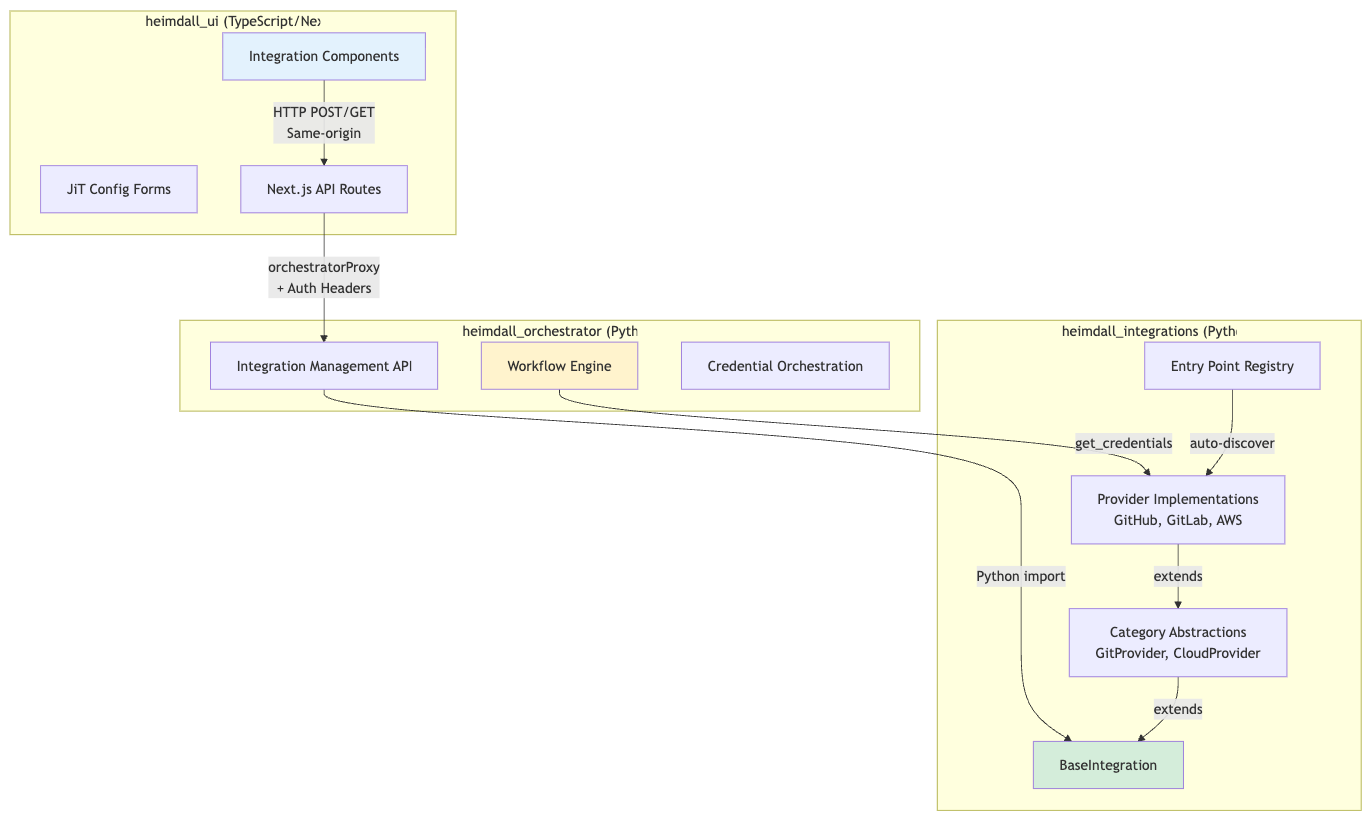
The integration system connects Heimdall to any third-party service without hardcoded forms. It's a three-layer architecture spanning three repositories.
Three-Layer Architecture
Provider Auto-Discovery (Entry Points)
Problem: Manual provider registration is error-prone and requires code changes.
Solution: Python entry points for automatic discovery.
# From heimdall_integrations/pyproject.toml
[project.entry-points."heimdall.integrations.providers"]
# Git providers
github = "heimdall_integrations.providers.git.github:GitHubProvider"
gitlab = "heimdall_integrations.providers.git.gitlab:GitLabProvider"

# Communication providers
slack = "heimdall_integrations.providers.communication.slack:SlackProvider"
discord = "heimdall_integrations.providers.communication.discord:DiscordProvider"
internal_email = "heimdall_integrations.providers.communication.internal_email:InternalEmailProvider"
aws_ses = "heimdall_integrations.providers.communication.aws_ses:AWSSESProvider"
Note: The backend Python services use entry points for automatic provider discovery. The frontend TypeScript modules (discussed in Part 1) use explicit imports, as Next.js doesn't have an equivalent built-in mechanism. Both systems follow the same principle: self-contained, declarative configuration.
Result:
- Add provider → Add entry point → Done
- No manual registration needed
- Registry discovers all providers at runtime
# From heimdall_integrations/core/registry.py
def _discover_providers(self):
    """
    Discover and load providers from entry points.

    Looks for entry points in group: "heimdall.integrations.providers"
    """
    try:
        entry_points = importlib.metadata.entry_points()

        # Handle both old and new entry_points API
        if hasattr(entry_points, 'select'):
            # Python 3.10+
            providers_eps = entry_points.select(group="heimdall.integrations.providers")
        else:
            # Python 3.9
            providers_eps = entry_points.get("heimdall.integrations.providers", [])

        for ep in providers_eps:
            try:
                # Load provider class
                provider_class = ep.load()

                # Instantiate
                provider = provider_class()

                # Register
                self.register(provider)

                logger.info(
                    f"Registered provider: {ep.name} "
                    f"({provider.display_name})"
                )
            except Exception as e:
                logger.error(f"Failed to load provider {ep.name}: {e}")
    except Exception as e:
        logger.error(f"Error discovering providers: {e}")
JSON Schema → UI Forms (JiT Configuration)
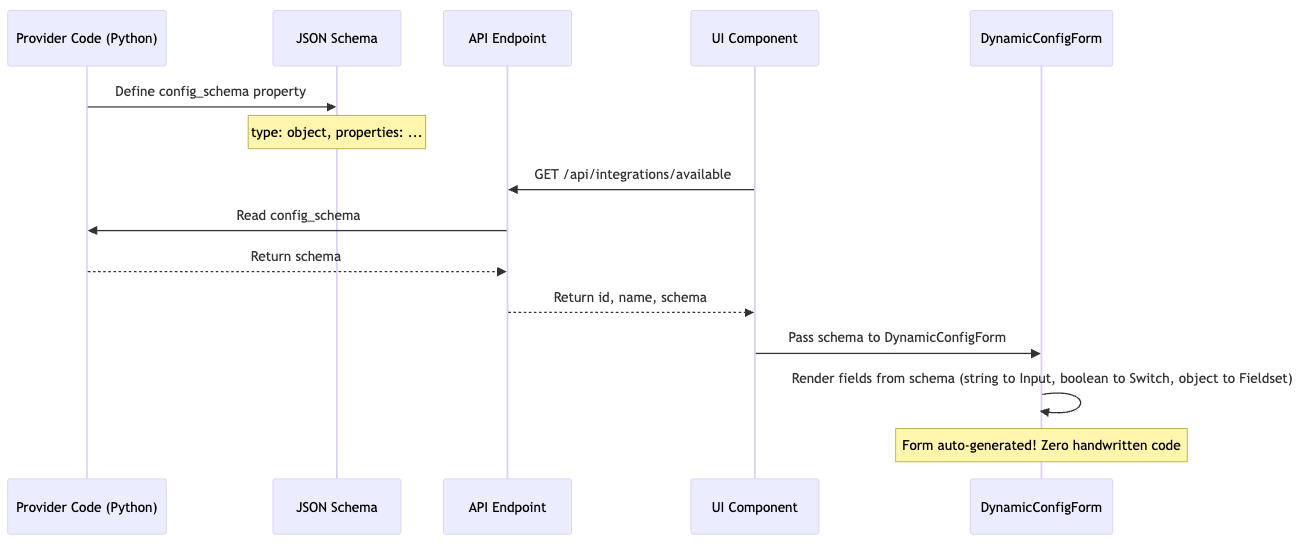
The Innovation: Config forms are never written by hand. They're generated from JSON Schema.
Example: GitHub Provider Schema
# heimdall_integrations/providers/git/github.py
class GitHubProvider(GitProvider):
    @property
    def config_schema(self) -> dict:
        return {
            "type": "object",
            "properties": {
                "installation_id": {
                    "type": "string",
                    "description": "GitHub App installation ID",
                    "pattern": "^[0-9]+$"
                },
                "features": {
                    "type": "object",
                    "properties": {
                        "webhooks_enabled": {
                            "type": "boolean",
                            "default": True,
                            "description": "Enable webhook notifications"
                        },
                        "pr_comments": {
                            "type": "boolean",
                            "default": True,
                            "description": "Post PR comments"
                        }
                    }
                }
            },
            "required": ["installation_id"]
        }
Auto-Generated Form (UI)
// This form is NEVER written by hand!
<DynamicConfigForm schema={githubSchema} value={config} onChange={setConfig} />

// Renders:
// ┌─────────────────────────────────────────┐
// │ Installation ID *                       │
// │ ┌─────────────────────────────────────┐ │
// │ │ 789012                              │ │
// │ └─────────────────────────────────────┘ │
// │                                         │
// │ Features                                │
// │ ┌───┐                                   │
// │ │ ✓ │ Enable webhook notifications      │
// │ └───┘                                   │
// │ ┌───┐                                   │
// │ │ ✓ │ Post PR comments                  │
// │ └───┘                                   │
// └─────────────────────────────────────────┘
Benefits:
- Add new provider → UI form appears automatically
- Change schema → UI updates automatically
- Validation from schema (client + server)
- Zero maintenance burden on UI team
Self-Contained Integration Components
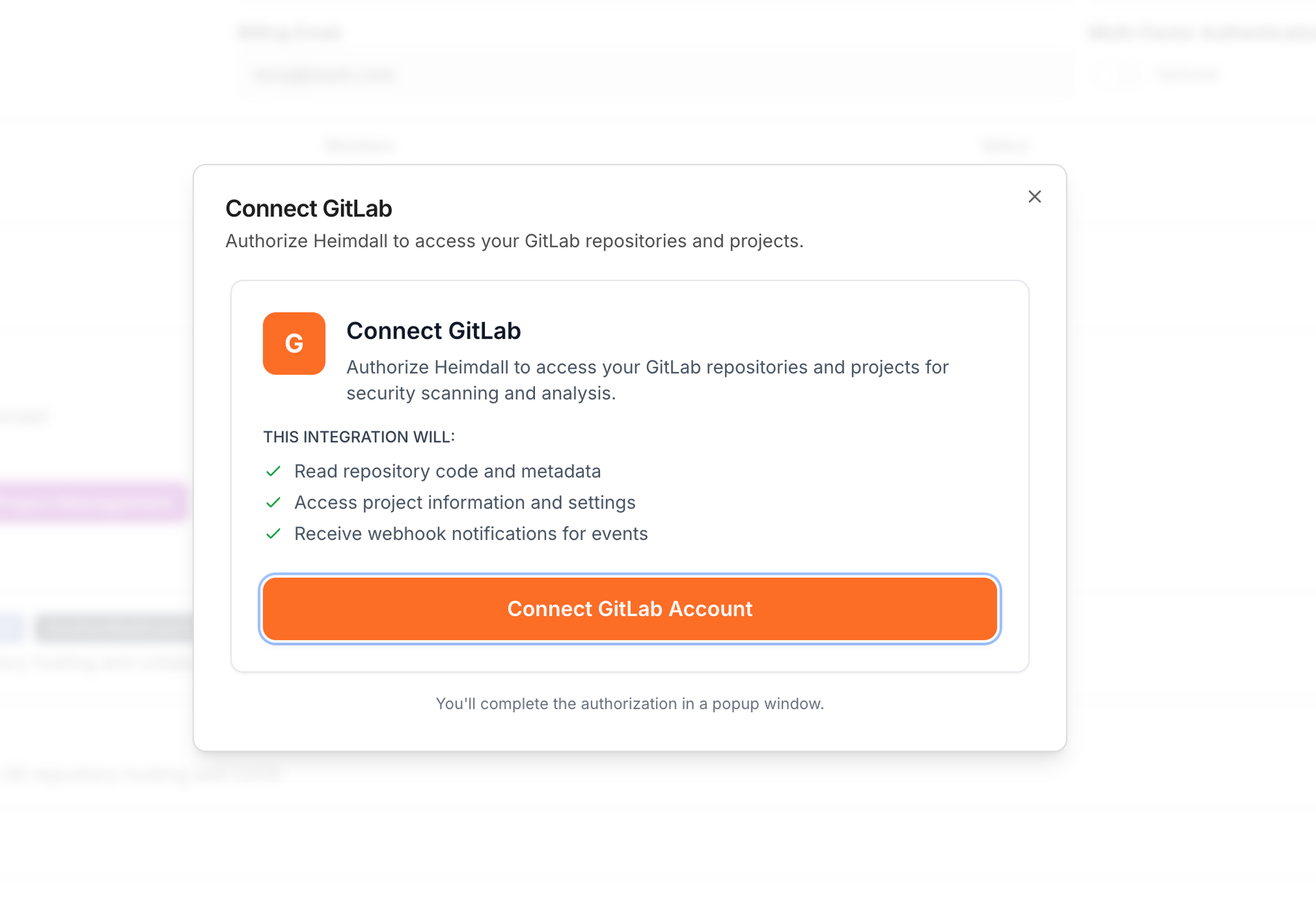
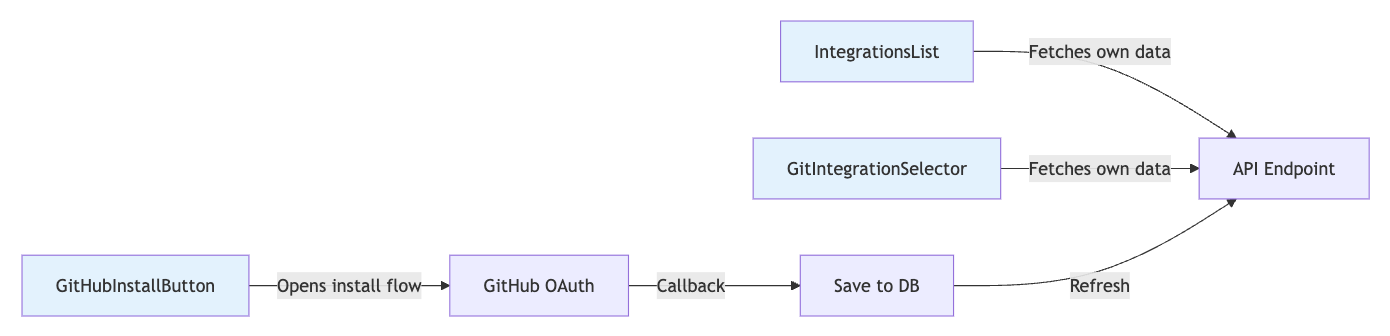
All integration UI lives in design system as self-contained components.
// Example: GitIntegrationSelector - completely self-contained
export function GitIntegrationSelector({ value, onChange }) {
  const [integrations, setIntegrations] = useState([]);
  const { accessToken } = useOrg();

  // Component fetches its own data - no prop drilling!
  useEffect(() => {
    fetch('/api/integrations/configs?category=git', {
      credentials: 'include',
      headers: { 'Authorization': `Bearer ${accessToken}` }
    })
      .then(res => res.json())
      .then(data => setIntegrations(data.filter(i => i.is_enabled)));
  }, [accessToken]);

  return (
    <Select value={value} onValueChange={onChange}>
      <SelectTrigger>
        <SelectValue placeholder="Select Git Integration" />
      </SelectTrigger>
      <SelectContent>
        <SelectItem value="none">None (Public repos only)</SelectItem>
        {integrations.map(int => (
          <SelectItem key={int.id} value={int.id}>
            {int.provider_metadata?.account_name || int.config_name}
            {` (${int.provider})`}
          </SelectItem>
        ))}
      </SelectContent>
    </Select>
  );
}
Usage anywhere:
// No setup needed - component handles everything
<GitIntegrationSelector
  value={selectedIntegration}
  onChange={setSelectedIntegration}
  showPrivateRepoHint
/>
CORS Prevention Pattern
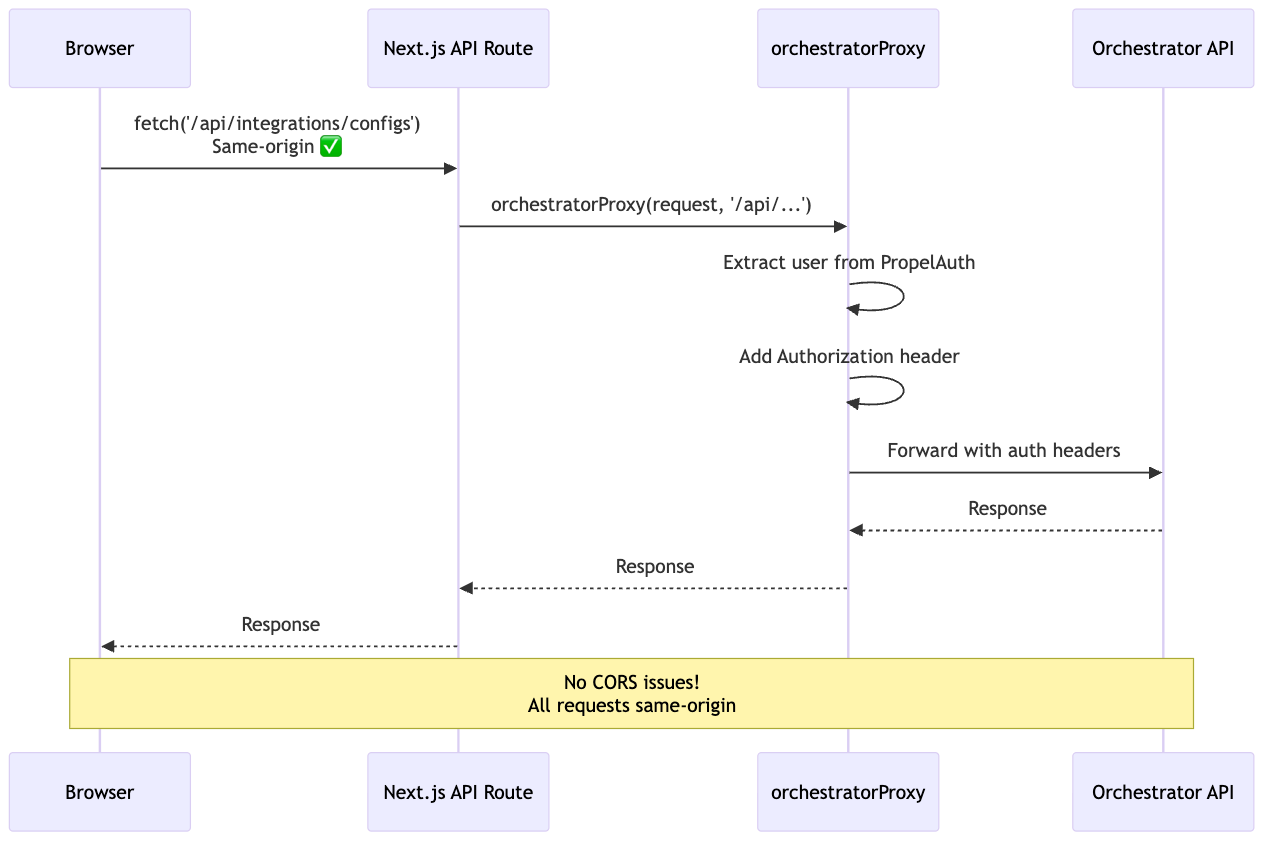
Problem: Browser → Backend = CORS error
Solution: Next.js API routes as same-origin proxy
// app/api/integrations/configs/route.ts
import { NextRequest } from 'next/server';
import { orchestratorProxy } from '@/lib/services/orchestrator-service';

export async function GET(request: NextRequest) {
  // orchestratorProxy:
  // 1. Extracts user from PropelAuth
  // 2. Adds Authorization header
  // 3. Forwards to backend
  return await orchestratorProxy(
    request,
    '/api/integrations/configs',
    { method: 'GET', cache: 'no-store' }
  );
}
Why this pattern?
- Browser can't call backend directly (CORS)
- Next.js API is same-origin (no CORS preflight)
- orchestratorProxy handles auth header injection
- Works with PropelAuth session cookies
Multi-Repository Coordination
Challenge: Integration spans 3 repos - how do they stay in sync?
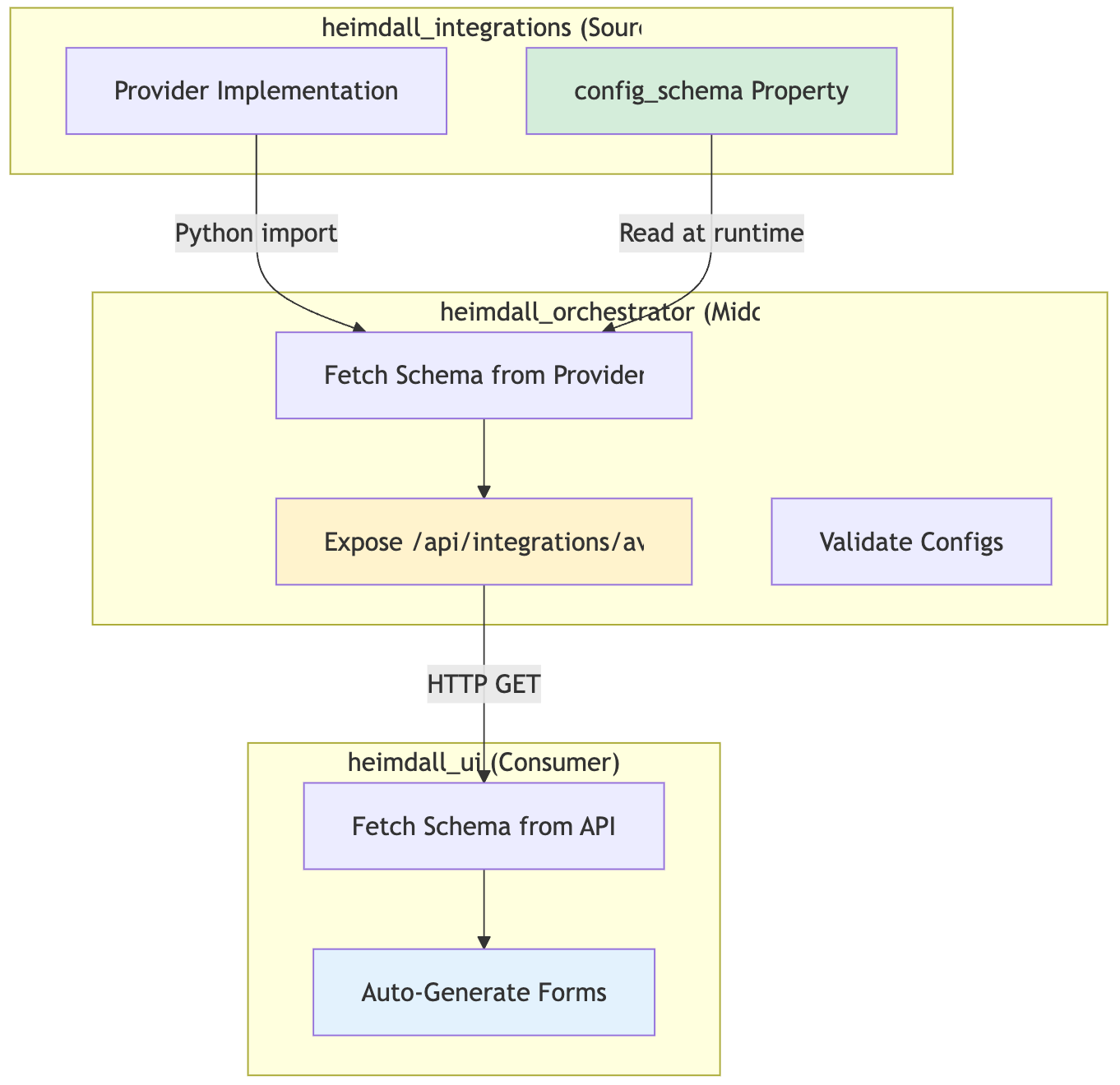
Key Insight: Provider code is the single source of truth.
- heimdall_integrations: Defines schema in provider class
- heimdall_orchestrator: Reads schema via Python import
- heimdall_ui: Fetches schema via HTTP API
Result: Change schema → UI updates automatically. Zero manual synchronization.
Design System
The design system (@heimdall/design-system) provides everything modules need to build UIs consistently.
Component Categories
shadcn/ui based] DS --> PATTERNS[Pattern Components
Reusable templates] DS --> INTEG[Integration Components
Provider UI] DS --> WL[White-Label Components
Theming system] DS --> THEME[Theme System
Light/dark + custom] DS --> UTILS[Utilities
Helpers + hooks] DS --> TYPES[TypeScript Types
Module interfaces] UI --> BUTTON[Button, Card, Dialog...] PATTERNS --> METRIC[MetricCard, DataTable...] INTEG --> SELECTOR[GitIntegrationSelector...] WL --> COLOR[ColorPaletteEditor...] THEME --> PROVIDER[ThemeProvider] UTILS --> HOOKS[useResponsive, useTheme...] style DS fill:#f9f9f9 style UI fill:#e3f2fd style PATTERNS fill:#fff3cd style INTEG fill:#d4edda
Usage Example
// Everything from one import
import {
  // UI Components
  Button, Card, Badge, Input, Select, Dialog,

  // Pattern Components
  MetricCard, DataTable, ActivityFeed,

  // Integration Components
  GitIntegrationSelector, IntegrationsList,

  // White-Label Components
  ColorPaletteEditor, ThemePreview,

  // Theme
  ThemeProvider, useTheme,

  // Utilities
  cn, formatDate, isMobile,

  // Hooks
  useResponsive,

  // Types
  HeimdalModule, ModuleDashboardWidget
} from '@heimdall/design-system';
Pattern Components (DRY Templates)
Problem: Every module needs similar components (cards, tables, metrics).
Solution: Reusable pattern components.
// MetricCard - used by all modules
<MetricCard
  title="Vulnerabilities"
  value="1,247"
  trend="+12%"
  trendPositive={false}
  icon={<AlertTriangle />}
/>

// DataTable - used by all modules
<DataTable
  columns={columns}
  data={data}
  searchable
  sortable
  filterable
  paginated
/>

// ActivityFeed - used by all modules
<ActivityFeed
  items={activities}
  renderItem={(activity) => (
    <div>{activity.description}```
  )}
/>
Result: Modules focus on business logic, not UI primitives.
Multi-Repository Coordination
The Challenge
Heimdall consists of 4 separate repositories, each with its own Claude Code session:
- heimdall_ui (TypeScript/Next.js) - Frontend
- heimdall_orchestrator (Python/FastAPI) - Backend workflows
- heimdall_integrations (Python Package) - Provider framework
- heimdall_tasks (Python/Docker) - ECS scanner tasks
Problem: How does AI maintain architectural consistency across repos?
The Solution: CLAUDE.md + Spec Kit
Each repository has a CLAUDE.md file that guides AI behavior:
heimdall_ui/
├── CLAUDE.md                    # UI development guide
├── COMPOSABLE_ARCHITECTURE.md   # This document
└── .claude/
    ├── skills/
    │   ├── add-module.skill.yaml
    │   └── add-integration-ui.skill.yaml
    └── spec_kit/
        └── modules/

heimdall_integrations/
├── CLAUDE.md                    # Integration development guide
├── README.md                    # Architecture overview
└── .claude/
    ├── skills/
    │   └── add-provider.skill.yaml
    └── spec_kit/
        └── providers/

heimdall_orchestrator/
├── CLAUDE.md                    # Orchestrator development guide
└── .claude/
    ├── skills/
    │   └── add-workflow.skill.yaml
    └── spec_kit/
        └── workflows/
CLAUDE.md Contents (UI Example):
# CLAUDE.md

This file provides guidance to Claude Code when working in this repository.

## Core Commands

```bash
pnpm dev           # Start dev server
pnpm build         # Build all packages
python tools/i18n_agent.py  # Translate i18n keys
Architecture Overview
Heimdall UI is a modular, plugin-based Next.js application.
Key Patterns
-
Modules are self-contained packages
- Location:
packages/my-module/ - Config:
src/module.config.ts - Register:
packages/core/src/config/init-modules.ts
- Location:
-
Integration components are self-contained
- Fetch their own data
- Work with any provider
- Located in
@heimdall/design-system
-
Convention over configuration
- Module ID: kebab-case
- Component names: PascalCase
- File locations: predictable
When to Use Spec Kit
- Adding a module →
.claude/spec_kit/modules/ - Adding a widget →
.claude/spec_kit/widgets/ - Adding integration UI → See
heimdall_integrationsrepo
Cross-Repo Dependencies
- UI forms auto-generated from integration schemas
- Schemas defined in
heimdall_integrations - API exposed by
heimdall_orchestrator
Process:
- Add provider in
heimdall_integrations - Schema appears in orchestrator API
- UI auto-generates form
- Zero UI code changes needed ✅
The orchestrator (⚙️ heimdall_orchestrator) also uses entry points for Temporal workflow discovery, enabling dynamic deployment of new vulnerability scans and compliance workflows without code changes to the orchestrator core.
Coordination Pattern
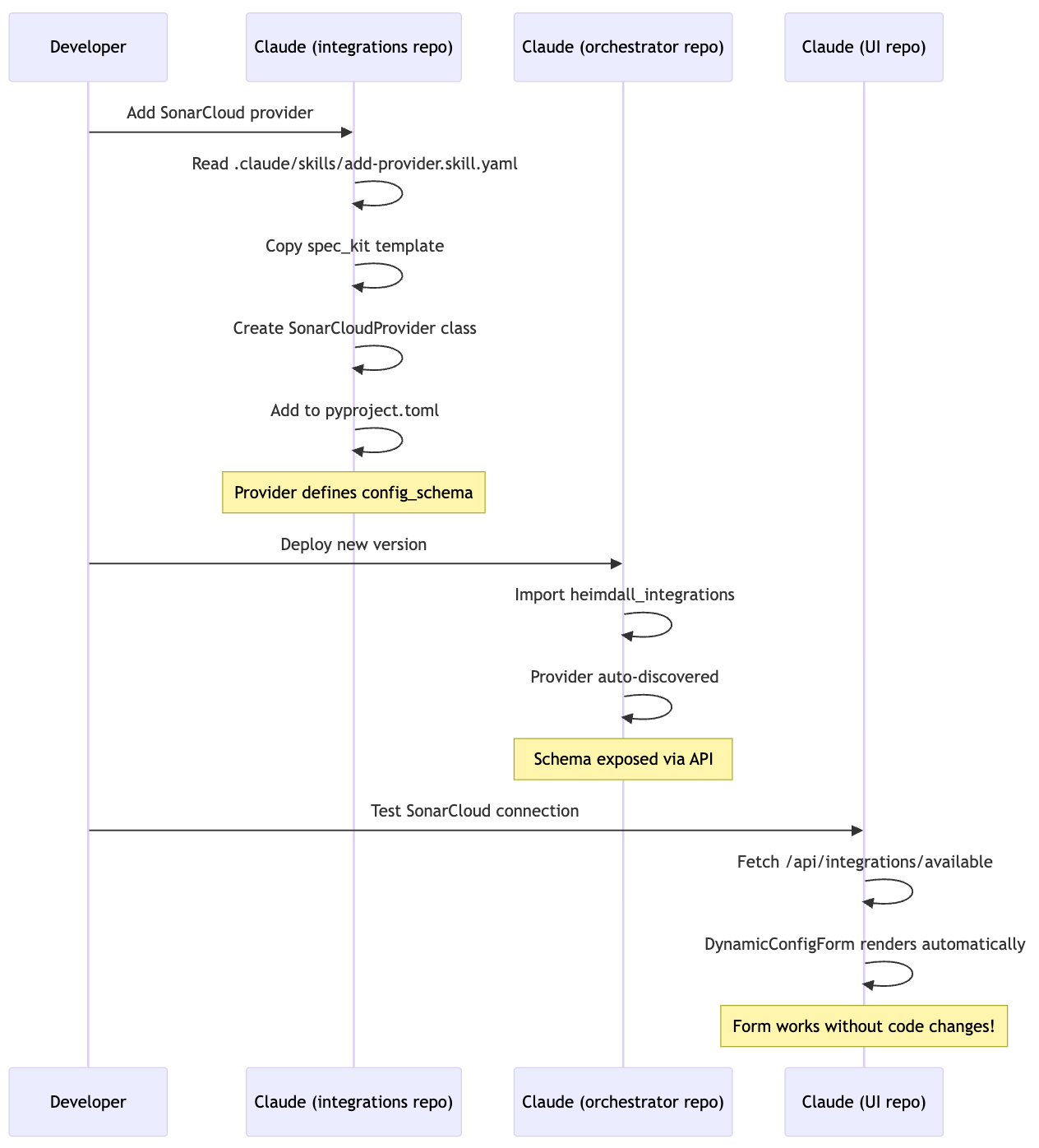
Key Insight: Each AI session only needs to understand its own repository. Cross-repo coordination happens through well-defined contracts (JSON Schema, API endpoints, types).
Examples and Usage Patterns
Example 1: Adding a Complete Feature (Code Quality Module)
Compliance Handling is a separately distributed feature that modularly fits into the UI
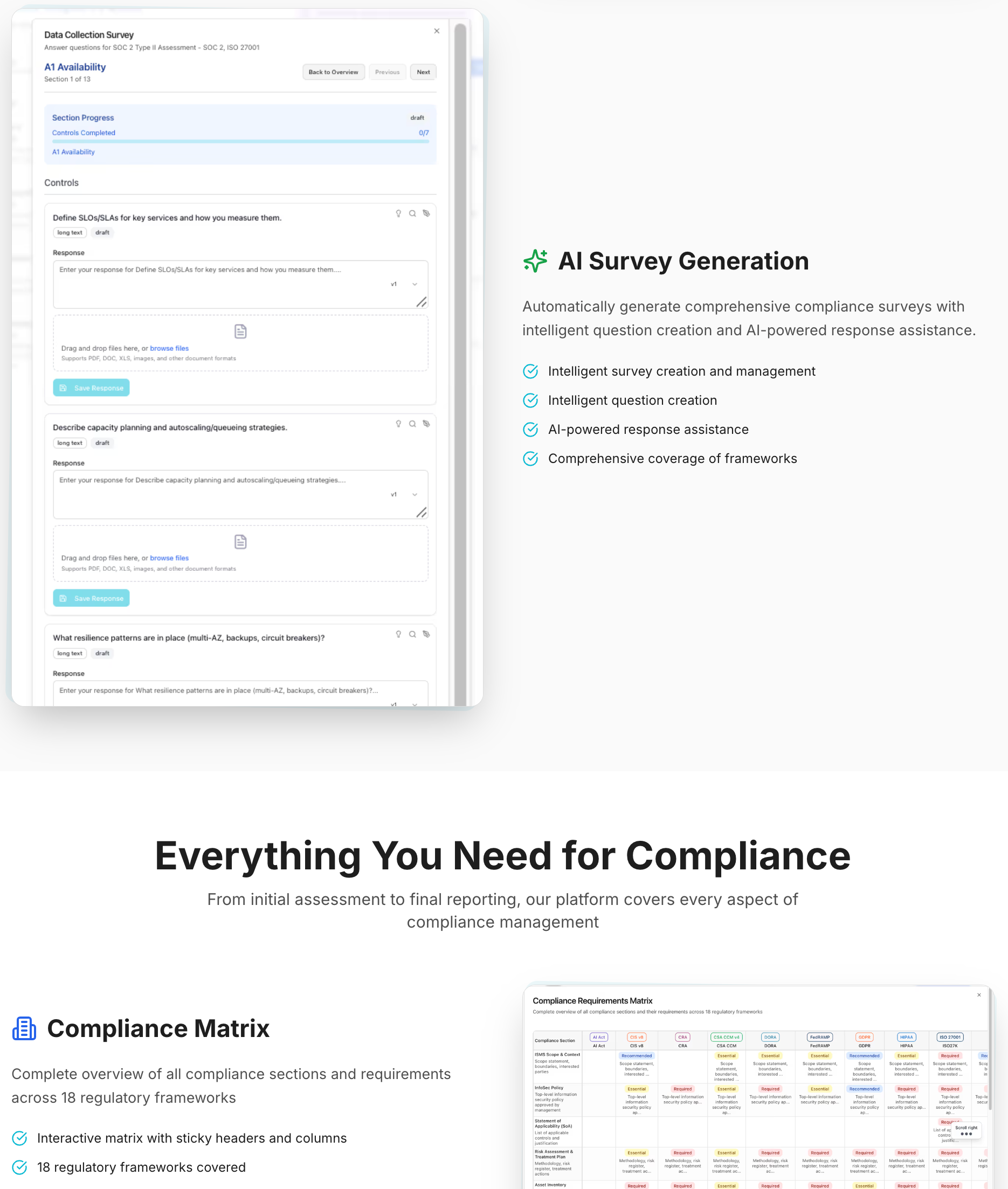
Goal: Add a code quality metrics module with dashboard widget, page, and SonarCloud integration.
Step 1: Add Integration Provider (heimdall_integrations repo)
# AI reads skill
.claude/skills/add-provider.skill.yaml

# AI copies template
cp .claude/spec_kit/providers/security-provider.template.py \
   heimdall_integrations/providers/security/sonarcloud.py

# AI substitutes placeholders
# {{PROVIDER_NAME}} → SonarCloud
# {{AUTH_TYPE}} → API_KEY

# AI registers provider
# pyproject.toml: sonarcloud = "...providers.security.sonarcloud:SonarCloudProvider"
Step 2: Add UI Module (heimdall_ui repo)
# AI reads skill
.claude/skills/add-module.skill.yaml

# AI creates package
mkdir -p packages/code-quality/src/{widgets,pages}

# AI copies templates
cp .claude/spec_kit/modules/module-config.template.ts \
   packages/code-quality/src/module.config.ts

cp .claude/spec_kit/modules/dashboard-widget.template.tsx \
   packages/code-quality/src/widgets/quality-widget.tsx

# AI registers module
# packages/core/src/config/init-modules.ts
import { codeQualityModule } from '@heimdall/code-quality';
registerModule(codeQualityModule);

# AI adds translations
# packages/core/src/messages/en.json
{
  "navigation": {
    "codeQuality": "Code Quality"
  }
}

# AI runs translation agent
python tools/i18n_agent.py packages/core/src/messages
Result:
- SonarCloud appears in integrations list ✅
- Connection form auto-generated from schema ✅
- Code Quality module appears in dashboard ✅
- Module page accessible at
/code-quality✅ - All text translated to 44 languages ✅
- Total AI sessions: 2 (one per repo)
- Total files created: ~5
- Lines of code: ~300
Example 2: Adding a Dashboard Widget
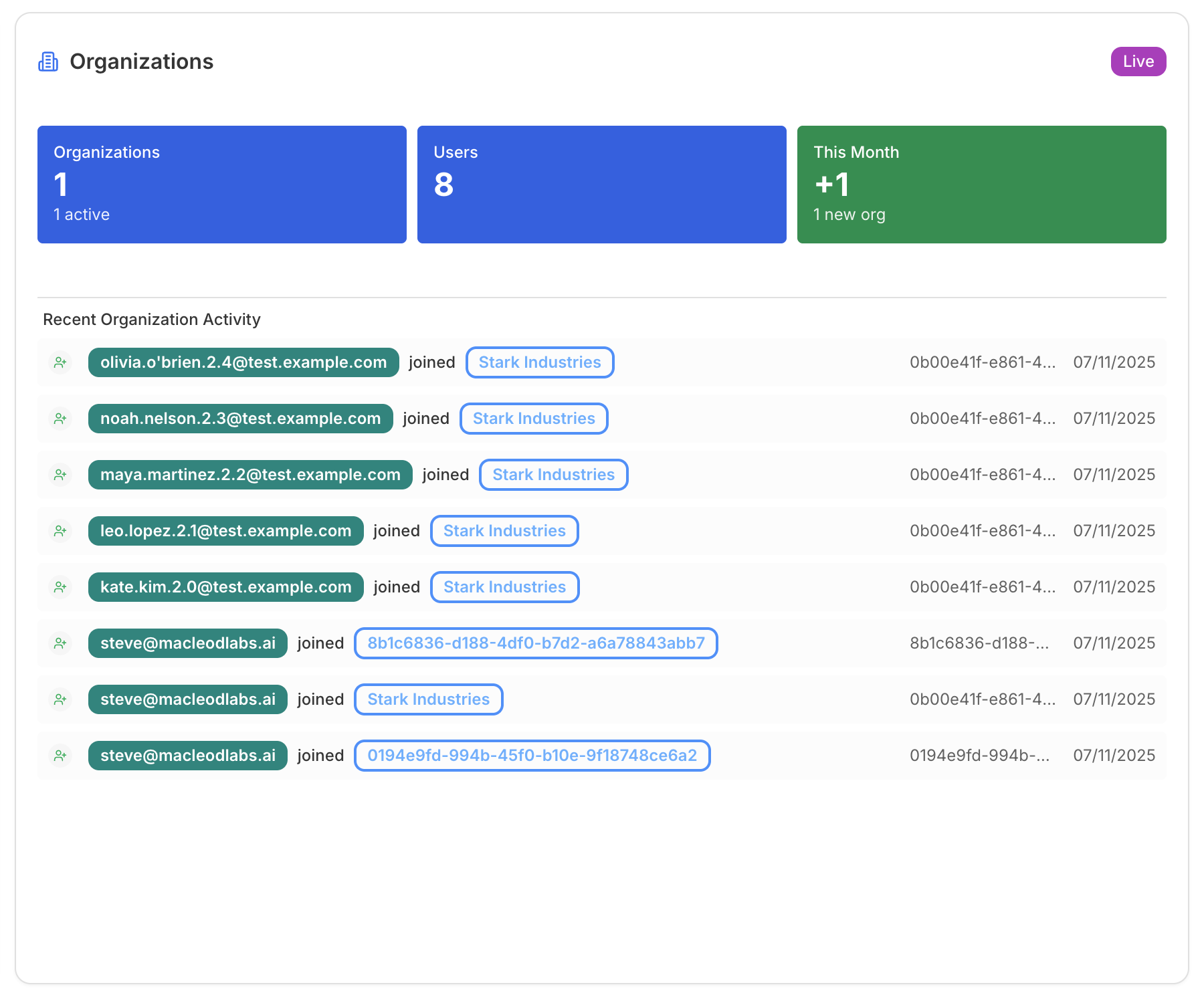
User: "Add a security score widget to the dashboard"
AI Process:
- Read
.claude/skills/add-widget.skill.yaml - Ask user for details (widget name, API endpoint, size)
- Copy template:
.claude/spec_kit/modules/dashboard-widget.template.tsx - Substitute placeholders
- Register in
module.config.ts:
dashboardWidgets: [{
  id: 'security-score',
  title: 'Security Score',
  component: SecurityScoreWidget,
  size: 'small',
  order: 1
}]
- Add i18n keys
- Run translation agent
Time: ~5 minutes
AI Context: <2K tokens (widget template + module config)
Example 3: Integrating with External Service
Complex UI's can be injected as well
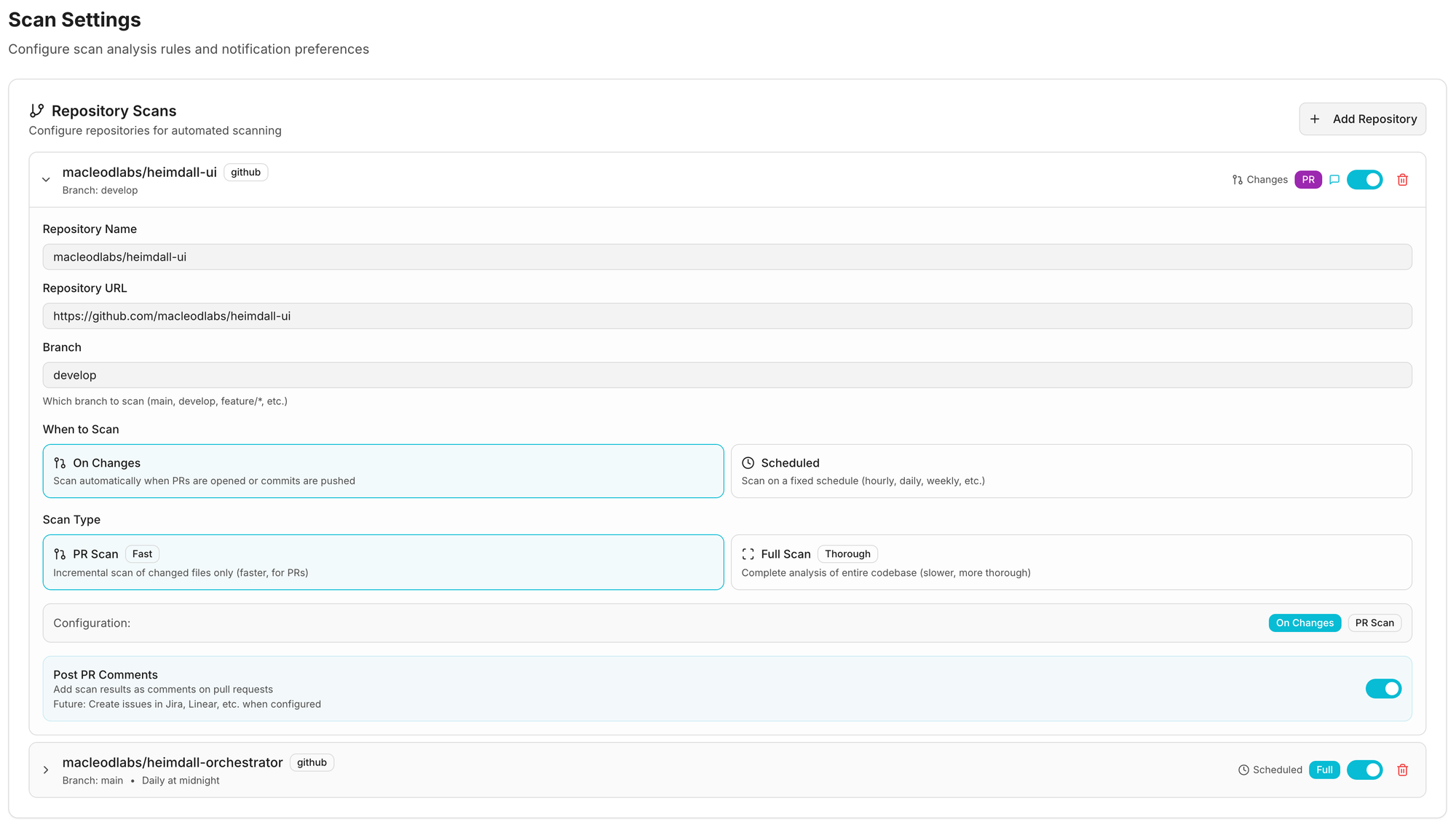
User: "Add support for Jira integration"
AI Process (heimdall_integrations repo):
- Read
.claude/skills/add-provider.skill.yaml - Ask: Category? →
project_management - Ask: Auth type? →
oauth - Copy template →
providers/project_management/jira.py - Substitute:
{{PROVIDER_NAME}}→Jira{{AUTH_TYPE}}→AuthType.OAUTH
- Add config_schema:
@property
def config_schema(self) -> dict:
    return {
        "type": "object",
        "properties": {
            "instance_url": {
                "type": "string",
                "description": "Jira instance URL"
            },
            "project_key": {
                "type": "string",
                "description": "Default project key"
            }
        },
        "required": ["instance_url"]
    }
- Register in pyproject.toml
Result:
- Jira provider available ✅
- OAuth flow handled by framework ✅
- Config form auto-generated ✅
- UI integration selector includes Jira ✅
- Zero UI code changes ✅
Plan Ahead
i18n built in from Day 1
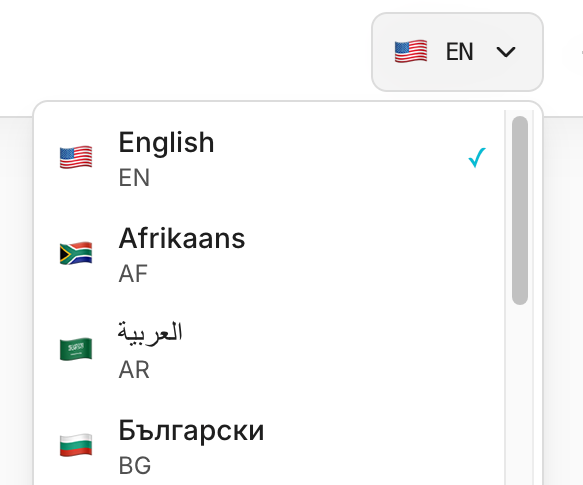
The application supports 44 languages with ~88,000 keys currently.
These are an impossible task to get right with an AI Copilot - it simply isn't thorough enough to keep all the languages up to date.
What I have done here, and captured in a claude skill / spec kit as well, is to create a script i18n_agent which parses the entire codebase looking for i18n keys, and extracts these to the en.json language file.
A second parallelized, batch parse, then cleans up all other 43 language files, and uses a small llm model to translate each one to the language required.
This has been an absolute lifesaver as the application scales.
Some pain points discovered along the way, is depth of key nesting, so watch out for this e.g. in grid cells or reports where you can go several layers deep.
# i18n Translation Agent - Pseudo Code
  # Automated translation workflow for 44 languages using Claude AI

  # ============================================================================
  # PHASE 1: VERIFICATION
  # ============================================================================
  def verify_translation_keys():
      """
      Scan entire codebase for translation key usage
      """
      for file in codebase:
          if is_typescript_or_jsx(file):
              # Find useTranslations() hooks
              hooks = extract_translation_hooks(file)

              # Find t('key') calls
              translation_calls = extract_t_function_calls(file)

              # Verify all keys exist in en.json
              for key in translation_calls:
                  if not exists_in_en_json(key):
                      report_error(f"Missing key: {key} in {file}")

      return verification_passed


  # ============================================================================
  # PHASE 2: TRANSLATION PROPAGATION
  # ============================================================================
  class I18nTranslationAgent:
      def __init__(self):
          self.llm = Claude(model="claude-3-5-haiku")
          self.source_file = "en.json"
          self.target_languages = [
              "es", "fr", "de", "pt", "it", "nl", "pl", "ru",
              "ja", "ko", "zh", "ar", "hi", # ... (44 total)
          ]

      def analyze_missing_translations(self, target_lang):
          """
          Compare target language file with en.json
          Returns list of missing keys
          """
          en_data = load_json("en.json")
          target_data = load_json(f"{target_lang}.json")

          en_keys = flatten_nested_dict(en_data)  # {dashboard.title, settings.api.key, ...}
          target_keys = flatten_nested_dict(target_data)

          missing_keys = en_keys - target_keys
          return missing_keys

      async def translate_batch(self, messages, target_lang):
          """
          Translate batch of messages using Claude AI
          """
          prompt = f"""
          Translate these UI messages from English to {target_lang}.

          CRITICAL RULES:
          1. Preserve ALL placeholders EXACTLY ({{variable}}, %s, etc.)
          2. Maintain technical terms (SBOM, OAuth, API, etc.)
          3. Return ONLY valid JSON with same keys
          4. Professional, formal tone for enterprise software

          Input:
          {json.dumps(messages)}
          """

          response = await self.llm.generate(prompt)
          translated = parse_json(response)

          return translated

      async def translate_language(self, target_lang):
          """
          Translate all missing keys for one language
          """
          missing_keys = self.analyze_missing_translations(target_lang)

          if not missing_keys:
              print(f"✓ {target_lang}: Already up to date")
              return

          print(f"→ {target_lang}: Translating {len(missing_keys)} keys...")

          # Batch translate in chunks of 50 keys
          for batch in chunk(missing_keys, size=50):
              translations = await self.translate_batch(batch, target_lang)

              # Merge translations back into target file
              target_data = load_json(f"{target_lang}.json")
              merge_translations(target_data, translations)
              save_json(f"{target_lang}.json", target_data)

          print(f"✓ {target_lang}: Complete")

      async def run(self):
          """
          Main execution: Translate all languages in parallel
          """
          print("=" * 80)
          print("PHASE 2: TRANSLATION - Propagating to 44 languages")
          print("=" * 80)

          # Translate all languages concurrently (10 at a time)
          tasks = [self.translate_language(lang) for lang in self.target_languages]
          await asyncio.gather(*tasks, max_concurrency=10)

          print("\n✓ All translations complete!")


  # ============================================================================
  # MAIN WORKFLOW
  # ============================================================================
  async def main():
      # Step 1: Verify codebase uses valid translation keys
      verification_passed = verify_translation_keys()

      if not verification_passed:
          print("⚠️  Verification warnings found (continuing anyway...)")

      # Step 2: Translate missing keys to all languages
      agent = I18nTranslationAgent()
      await agent.run()

      # Step 3: Validate all translations
      for lang in agent.target_languages:
          validate_placeholders(lang)
          validate_json_structure(lang)

      print("\n🎉 i18n workflow complete!")


  # ============================================================================
  # USAGE
  # ============================================================================
  # python tools/i18n_agent.py packages/core/src/messages
  # python tools/i18n_agent.py packages/core/src/messages --dry-run
  # python tools/i18n_agent.py packages/core/src/messages --language fr

  Key Features:

  1. Two-Phase Approach:
    - Phase 1: Verification (Node.js script scans codebase)
    - Phase 2: Translation (Python + Claude AI)
  2. Smart Batching:
    - Processes 50 keys at a time
    - Concurrent translation (10 languages in parallel)
    - Exponential backoff retry on API errors
  3. Safety Guarantees:
    - Preserves placeholders ({{variable}}, %s, etc.)
    - Validates JSON structure
    - Dry-run mode for testing
    - Single language mode for debugging
  4. Performance:
    - Claude 3.5 Haiku (fast + cost-effective)
    - Async/await for parallel processing
    - Only translates missing keys (incremental updates)

  Result: Maintaining 44 languages with 1200+ keys takes ~2 minutes instead of hours of manual work.
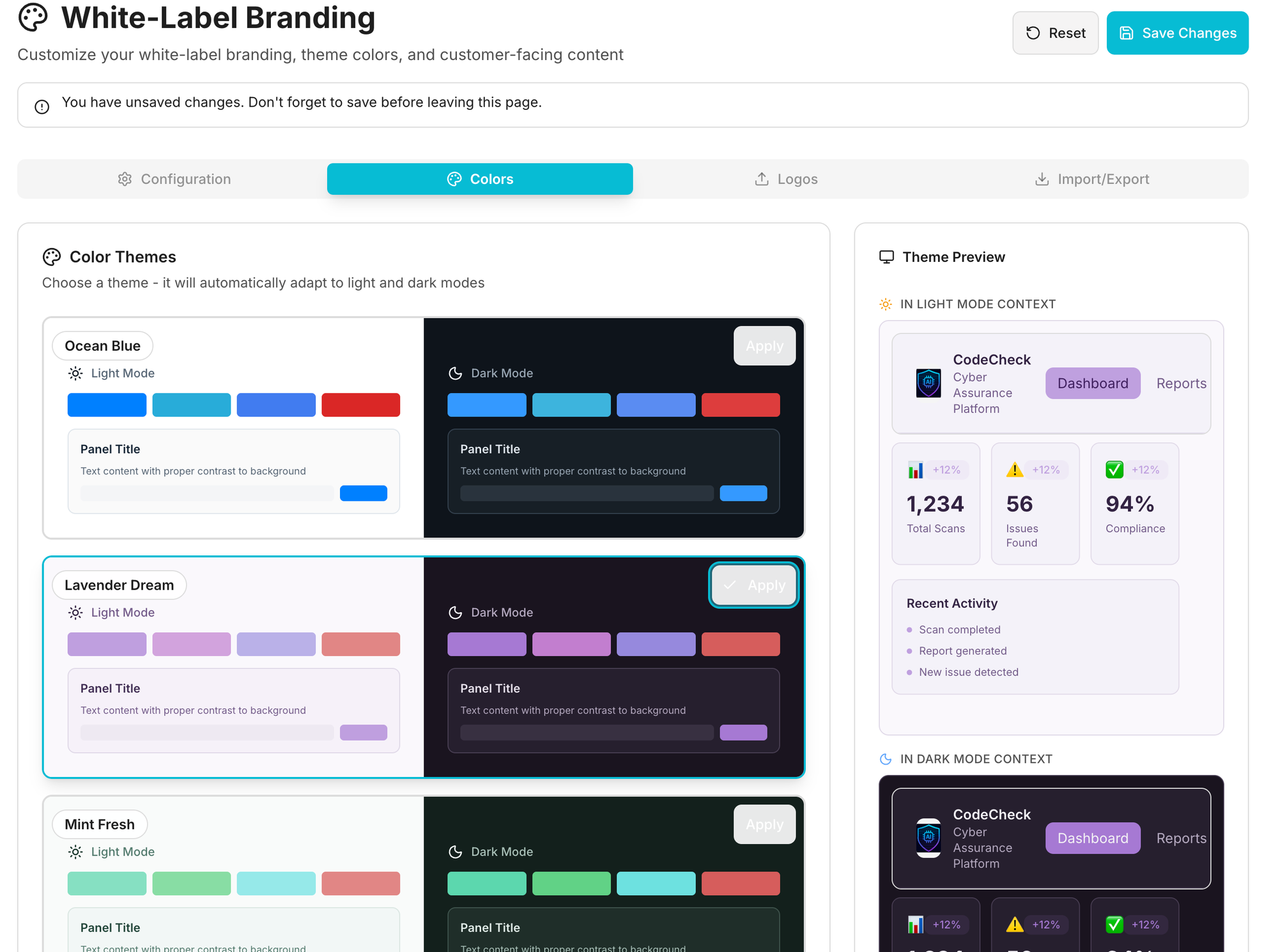
Build White labeling in as part of your Theming
Aim high
This should be fairly straightforward, though I'll probably find a decent 3rd party component for this if it exists, or i'll open source what I have later.
Things to consider into a branding pack:
- App name
- Privacy notice
- Terms and Conditions
- Home URL
- Documentation
- Colors and Themes of course
- Logos, Favicon, etc.
- i18n text
- ... probably more i've missed here.
Key Takeaways for AI Development
1. Context Window Optimization
Traditional approach:
AI loads entire codebase (50K LOC) = 150K tokens
Remaining context: 50K tokens
Result: Can barely load one module
Our approach:
AI loads:
- Core architecture (10K tokens)
- Design system types (5K tokens)
- Current module (3K tokens)
- Spec kit templates (2K tokens)
= 20K tokens

Remaining context: 180K tokens
Result: AI can hold 5-6 modules simultaneously
2. Pattern Recognition Over Understanding
AI doesn't need to understand how the system works. AI just needs to recognize patterns and apply them.
// AI doesn't need to understand module registry internals
// AI just copies this pattern:
export const myModule = {
  id: 'my-module',
  dashboardWidgets: [...]
};

// Framework handles the rest
3. Declarative Over Imperative
Imperative (AI struggles):
// AI must understand:
// - When to register
// - How to validate
// - Where to store services
// - When to call lifecycle hooks
registerModule(myModule);
Declarative (AI succeeds):
// AI just declares intent:
export const myModule = {
  id: 'my-module',
  dependencies: ['other-module'],
  onLoad: async () => { /* init */ }
};
// Framework figures out the rest
4. Single Source of Truth
Bad (multiple sources):
Provider code (Python) → Manual docs → UI forms (TypeScript)
= 3 places AI needs to update
= Sync issues inevitable
Good (single source):
Provider code (Python) with config_schema
↓ Auto-discovered via entry points
↓ Exposed via API
↓ Forms auto-generated
= 1 place AI updates
= Sync guaranteed
5. Fail Fast with Types
TypeScript catches AI mistakes before runtime:
// AI tries to create invalid module
export const badModule = {
  id: 'my-module',
  dashboardWidgets: {  // ❌ Should be array
    component: MyWidget
  }
};

// TypeScript compiler error:
// Type '{ component: ComponentType }' is not assignable to 'ModuleDashboardWidget[]'
//                                                         ^^^^^^^^^^^^^^^^^^^^^^
// Expected array, got object
Result: AI gets immediate feedback, fixes mistakes before running code.
Conclusion
We built an architecture optimized for both AI and human developers:
For AI:
- ✅ Fits in context window (modular boundaries)
- ✅ Patterns over understanding (spec kit templates)
- ✅ Declarative over imperative (config objects)
- ✅ Self-documenting (types + comments)
- ✅ Fail fast (TypeScript validation)
For Humans:
- ✅ Consistent patterns across codebase
- ✅ Hot reload during development
- ✅ Type-safe composition
- ✅ Zero-config extensibility
- ✅ Comprehensive documentation
The Innovation: JiT Configuration UIs
The key innovation that makes this architecture infinitely extensible:
Traditional:
Add provider → Write backend code → Write UI forms → Write validation
= 3 layers of code AI needs to coordinate
Ours:
Add provider → Define JSON Schema
= UI forms + validation auto-generated
= 1 layer of code AI touches
This single insight eliminates an entire class of coordination problems.
The Core Insight
AI-optimized architecture is fundamentally about patterns, not mechanisms:
- ✅ Uniform module structure (AI learns once, applies everywhere)
- ✅ Declarative configuration (no hidden logic to discover)
- ✅ Self-contained units (~3,000 tokens fit in context)
- ✅ Predictable locations (no exploration required)
- ✅ Clear boundaries (no circular dependencies)
Whether modules register via entry points, explicit imports, or database entries is secondary to maintaining these consistent patterns across your codebase.
Evolution Note: As systems scale, registration mechanisms can evolve (manual → auto-discovery, file-based → dynamic) without changing the underlying architectural patterns that enable AI comprehension.