
Heimdall - A Composable Architecture for AI: Part 1
How I built a production-scale application designed for AI comprehension and autonomous development
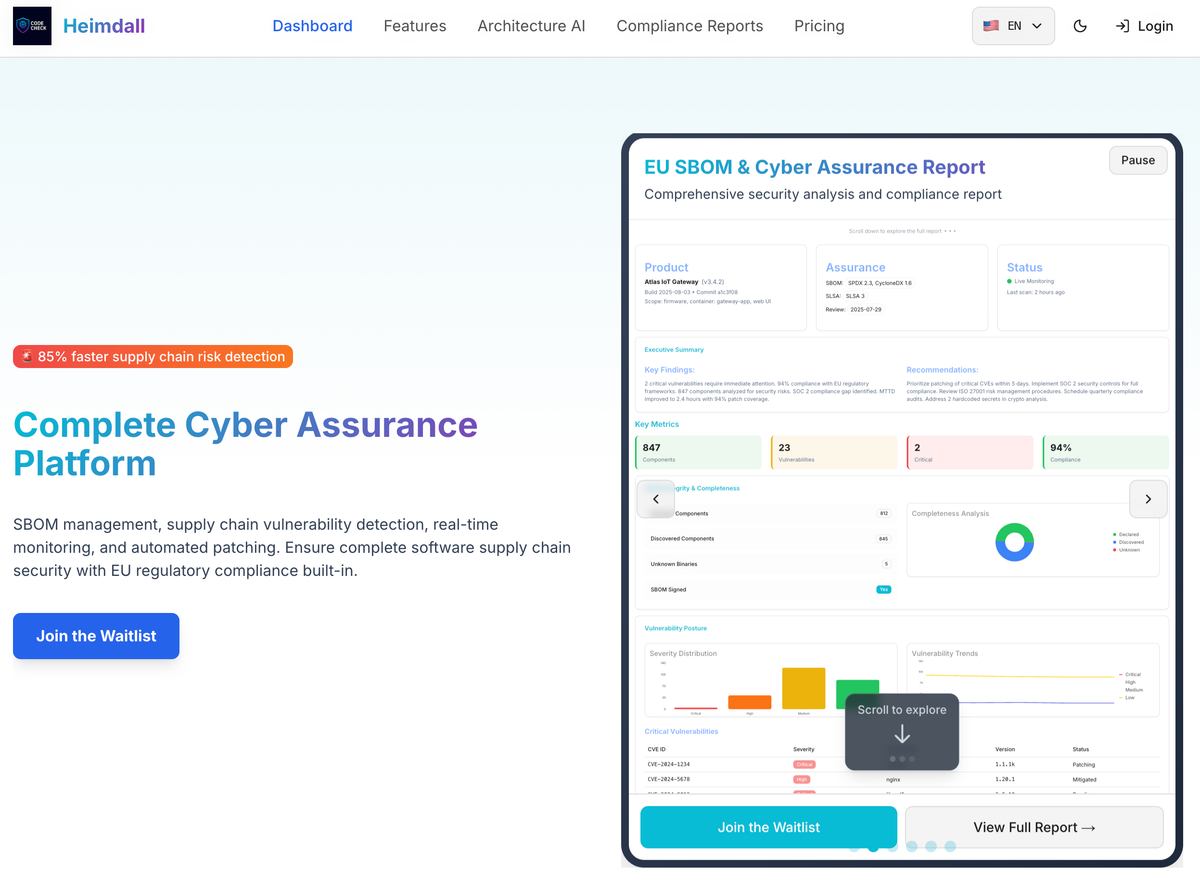
Executive Summary
Situation: The AI Coding Context Challenge
Modern AI coding assistants (Claude, GPT-4, etc.) have a fundamental limitation: context window size. Even with 200K token windows, large enterprise applications exceed what an AI can comprehend in a single session.
The traditional monolith approach fails:
- 50K+ lines of code across hundreds of files
- Complex interdependencies that require understanding the entire codebase
- AI loses track of architecture decisions made earlier
- Changes in one area break unrelated features
- Productivity drops as codebase grows
Current state of AI-assisted development:
- AI excels at small, focused tasks (single component, isolated function)
- AI struggles with system-level architecture decisions
- Context thrashing: AI forgets earlier decisions within same session
- Knowledge silos: Each conversation starts from scratch
Complication: The Multi-Repository Coordination Problem
The obvious solution - splitting into microservices - creates new problems:
Repository fragmentation:
- Backend (heimdall_orchestrator) - FastAPI workflows
- Integrations (heimdall_integrations) - Provider framework
- Frontend (heimdall_ui) - Next.js application
- Tasks (heimdall_tasks) - ECS scanner implementations
Coordination challenges:
- How do repositories communicate architecture decisions?
- How does AI understand cross-repo dependencies?
- How do you maintain consistency across TypeScript and Python?
- How do you document patterns that span multiple repos?
The Claude Code dilemma:
- Each repo gets a separate Claude Code session
- No cross-repo memory or context sharing
- Changes in one repo require manual synchronization
- Architecture knowledge scattered across READMEs
Resolution: Self-Documenting, Composable Architecture
We designed an architecture that is AI-native - optimized for both AI comprehension and human development:
1. Self-Contained Modules
- Each module is a complete package with its own docs
- AI can understand a module without loading the entire codebase
- Changes are localized - no ripple effects
2. Convention Over Configuration
- Consistent patterns across all modules
- AI learns the pattern once, applies everywhere
- Predictable file locations and naming
3. Just-in-Time Code Generation
- JSON Schema drives UI generation
- AI doesn't need to write forms - they're auto-generated
- Provider code is the source of truth
4. Claude Skills + Spec Kit Integration
- Each feature has a Claude Skill (YAML spec)
- Spec Kit contains reference implementations
- AI can reference patterns instead of inventing new ones
5. Living Documentation
- CLAUDE.md files in each repo guide AI behavior
- Architecture decisions documented as code
- Examples show correct usage patterns
Examples: How It Works in Practice
Example 1: Adding a New Integration Provider
Traditional approach (AI struggles):
1. Write provider code (Python)
2. Write orchestrator endpoints (FastAPI)
3. Write UI forms (React)
4. Write validation logic (both backend + frontend)
5. Update multiple API routes
6. Update type definitions
7. Write tests for all layers
= 7 different files AI needs to coordinate
Our approach (AI succeeds):
1. Define provider class with config_schema (Python)
2. Register in pyproject.toml entry points
= UI forms auto-generate, types inferred, validation from schema
= 2 files, AI never loses context
Example 2: Creating a New Feature Module

AI doesn't need to understand:
- How module registry works
- How routing is configured
- How i18n is wired up
- How dashboard widgets render
AI just follows the pattern. The architecture does the rest.
Table of Contents
PART 1 (this blog - 🎨 Frontend)
- AI-Native Architecture Principles
- Claude Skills & Spec Kit Integration
- Core Architecture Patterns
- Module System
PART 2 (🔌 Backend Integrations and ⚙️ Workflows)
heimdall-ui-a-composable-architecture-part-2
- Integration Framework
- Design System
- White-Label Theming
- Just-in-Time Configuration UI
- Multi-Repository Coordination
- Examples and Usage Patterns
AI-Native Architecture Principles
Principle 1: Optimize for Context Window Efficiency
Problem: AI has 200K tokens, but can't comprehend 50K+ LOC codebases.
Solution: Modular boundaries that fit in context windows.
Target: Each module < 5K tokens
- Module definition: ~100 lines
- Main component: ~200 lines
- Widget components: ~100 lines each
- Services: ~150 lines each

Total: ~1,000 lines = ~3,000 tokens ✅

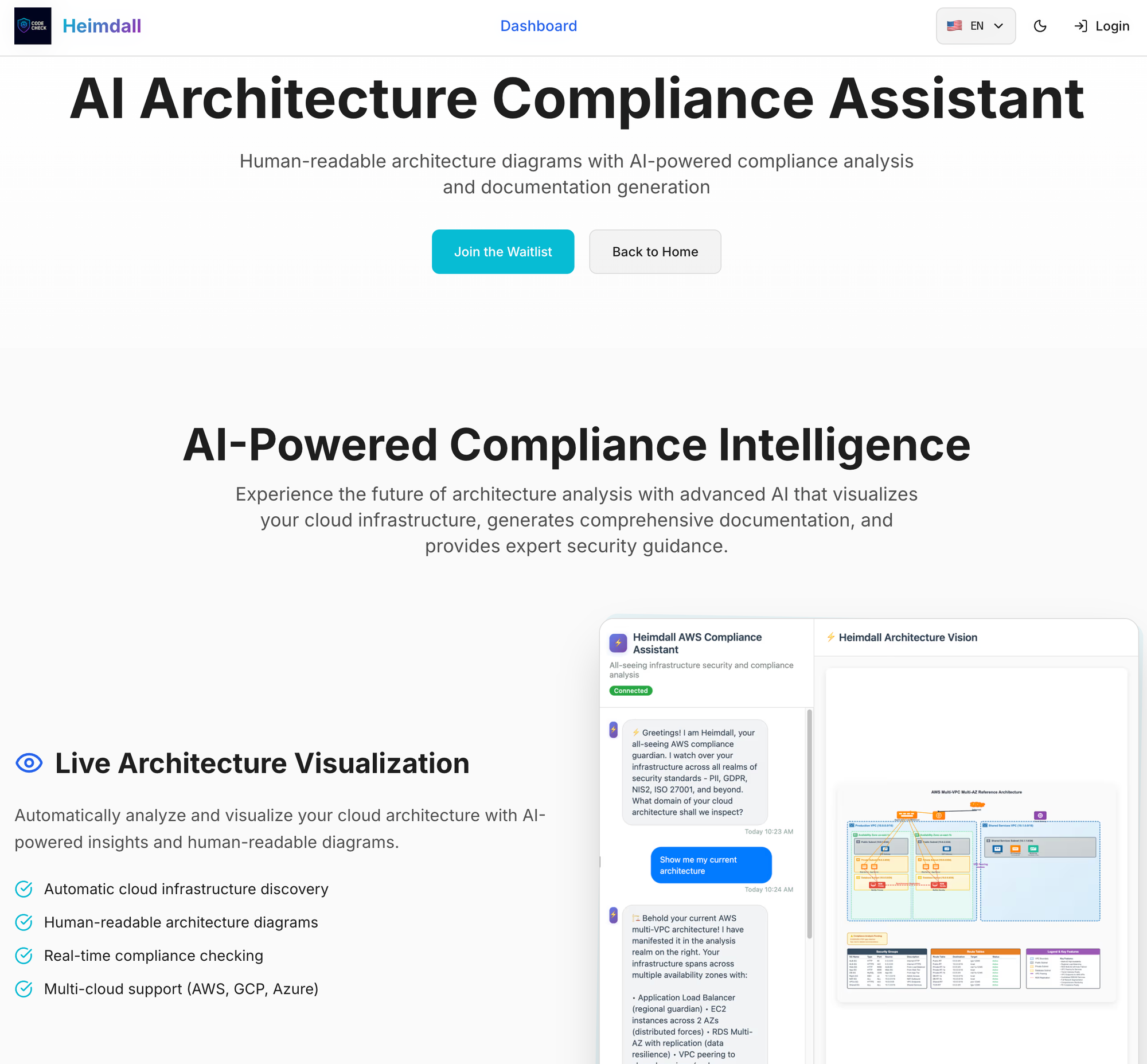
Result: AI can load entire architecture + 3-4 modules simultaneously.
Principle 2: Convention Over Configuration
Problem: AI needs to understand unique configurations for each feature.
Solution: Consistent patterns that AI learns once, applies everywhere.
// EVERY module follows this exact pattern
export const myModule: HeimdalModule = {
  id: 'module-id',              // Always kebab-case
  name: 'Display Name',         // Always title case
  version: '1.0.0',             // Always semver

  dashboardWidgets: [...],      // Always same structure
  pages: [...],                 // Always same structure
  services: {...}               // Always same structure
};
AI learns:
- One module pattern → applies to all modules
- One widget pattern → applies to all widgets
- One integration pattern → applies to all providers
Contrast with traditional architecture:
Module A: Uses Redux for state
Module B: Uses MobX for state
Module C: Uses Context API
= AI must learn 3 different patterns ❌
Principle 3: Self-Documenting Code
Problem: AI can't read external documentation during coding.
Solution: Code structure IS the documentation.
// BAD: AI needs to read docs to understand
interface ModuleConfig {
  data: any;
  meta: any;
}

// GOOD: AI understands from types alone
interface HeimdalModule {
  // Module identity
  id: string;
  name: string;
  version: string;

  // Dashboard contributions
  dashboardWidgets?: ModuleDashboardWidget[];
  dashboardMenuItem?: ModuleNavItem;

  // Lifecycle hooks
  onLoad?: () => void | Promise<void>;
}
Key insight: Types + comments = AI documentation.
Principle 4: Declarative Over Imperative
Problem: AI struggles with complex imperative logic.
Solution: Declare intent, let framework handle implementation.
// IMPERATIVE (AI struggles)
function addModule(module) {
  // Check if already registered
  if (registry.has(module.id)) return;

  // Validate dependencies
  for (const dep of module.deps || []) {
    if (!registry.has(dep)) {
      throw new Error(`Missing dep: ${dep}`);
    }
  }

  // Register module
  registry.set(module.id, module);

  // Register services
  if (module.services) {
    serviceRegistry.set(module.id, module.services);
  }

  // Call lifecycle
  if (module.onLoad) {
    await module.onLoad();
  }
}

// DECLARATIVE (AI succeeds)
export const myModule = {
  id: 'my-module',
  dependencies: ['other-module'],
  services: { myService },
  onLoad: async () => { /* ... */ }
};
// Framework handles all the logic above ✅
AI contribution: Declares what module needs, not how to register it.
Principle 5: Reference Implementations (Spec Kit)
Problem: AI invents new patterns instead of following existing ones.
Solution: Spec Kit with reference implementations AI can copy.
.claude/
├── skills/
│   ├── add-module.skill.yaml
│   ├── add-integration.skill.yaml
│   └── add-widget.skill.yaml
└── spec_kit/
    ├── module-template/
    │   ├── module.config.ts.template
    │   ├── widget.tsx.template
    │   └── page.tsx.template
    ├── integration-template/
    │   └── provider.py.template
    └── examples/
        ├── reference-module/
        └── reference-provider/
AI workflow:
- User: "Add a new code quality module"
- Claude: Reads
add-module.skill.yaml - Claude: Copies
module-template/ - Claude: Substitutes placeholders
- Done - no need to "understand" the system
Claude Skills & Spec Kit Integration
What is a Claude Skill?
A Claude Skill is a YAML specification that tells Claude Code how to perform a task:
# .claude/skills/add-integration-provider.skill.yaml
name: add-integration-provider
description: Add a new integration provider (e.g., GitLab, Bitbucket, AWS)

context_files:
  - heimdall_integrations/README.md
  - heimdall_integrations/core/base.py
  - heimdall_integrations/categories/*.py
  - .claude/spec_kit/integration-template/

steps:
  1. Read spec_kit/integration-template/provider.py.template
  2. Ask user for provider details (name, category, auth type)
  3. Copy template to providers/{category}/{provider}.py
  4. Substitute placeholders ({{PROVIDER_NAME}}, etc.)
  5. Add entry to pyproject.toml [project.entry-points]
  6. Run tests: pytest tests/unit/providers/{category}/test_{provider}.py
  7. Update docs: Add provider to README.md table

validation:
  - Provider class extends correct base class
  - config_schema is valid JSON Schema
  - Entry point is registered
  - Tests pass

examples:
  - .claude/spec_kit/examples/github-provider/
  - .claude/spec_kit/examples/sonarcloud-provider/
How AI uses this:
- Skill defines the exact process to follow
- AI doesn't need to figure out what files to create
- AI doesn't need to understand the entire codebase
- AI just executes steps 1-7
Spec Kit Structure
.claude/spec_kit/
├── README.md                              # Overview of all templates
│
├── modules/                               # Frontend module templates
│   ├── dashboard-widget.template.tsx
│   ├── landing-showcase.template.tsx
│   ├── module-config.template.ts
│   ├── module-page.template.tsx
│   └── examples/
│       ├── sbom-pentest/                  # Reference: Full-featured module
│       └── agency-mode/                   # Reference: Minimal module
│
├── integrations/                          # Backend integration templates
│   ├── git-provider.template.py           # Template for git providers
│   ├── cloud-provider.template.py         # Template for cloud providers
│   ├── security-provider.template.py      # Template for security tools
│   └── examples/
│       ├── github/                        # Reference: GitHub App implementation
│       └── sonarcloud/                    # Reference: API key auth
│
├── ui-components/                         # Design system component templates
│   ├── integration-selector.template.tsx
│   ├── config-form.template.tsx
│   └── examples/
│       └── git-integration-selector/      # Reference implementation
│
└── workflows/                             # Orchestrator workflow templates
    ├── scan-workflow.template.py
    └── examples/
        └── pr-scan/                       # Reference: PR scanning workflow
Example: Using Spec Kit to Add a Module
User Request: "Add a code quality metrics module"
AI Process:
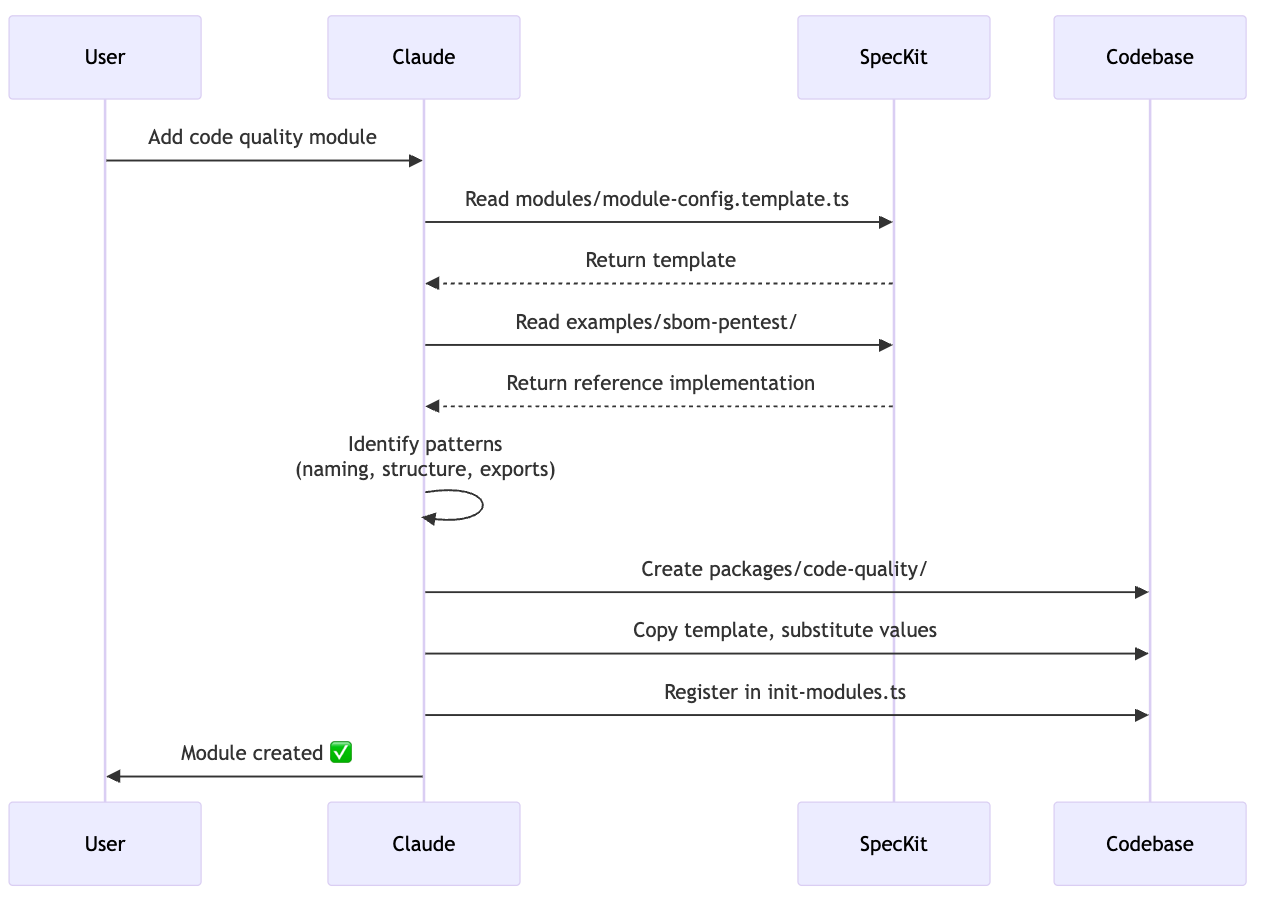
What Claude does NOT need to understand:
- How module registry works internally
- How routing is configured
- How dashboard rendering works
- How i18n translation keys are resolved
What Claude DOES:
- Copies pattern from spec kit
- Substitutes names/IDs
- Follows registration convention
Result: Module works immediately because it follows the proven pattern.
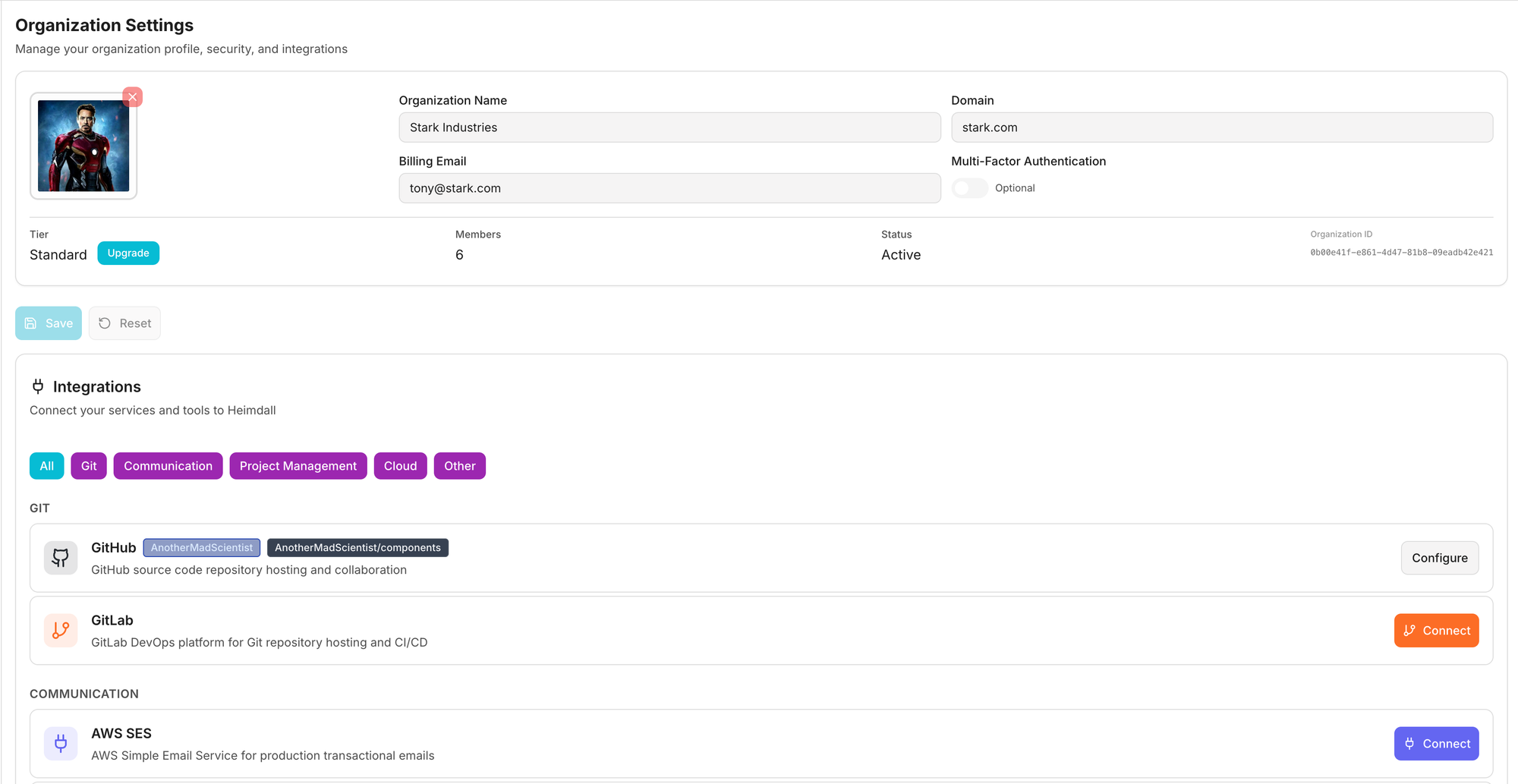
Example: Adding an Integration Provider
All integrations are discovered and loaded into the application, backend and frontend components separately.
# .claude/spec_kit/integrations/security-provider.template.py

"""
{{PROVIDER_NAME}} Provider
{{DESCRIPTION}}
"""

from heimdall_integrations.categories.security import SecurityProvider
from heimdall_integrations.core.types import AuthType, IntegrationCredentials

class {{PROVIDER_CLASS}}Provider(SecurityProvider):
    @property
    def provider_type(self) -> str:
        return "{{PROVIDER_ID}}"

    @property
    def display_name(self) -> str:
        return "{{PROVIDER_NAME}}"

    @property
    def supported_auth_types(self) -> list[AuthType]:
        return [{{AUTH_TYPES}}]

    @property
    def config_schema(self) -> dict:
        return {
            "type": "object",
            "properties": {
                {{CONFIG_PROPERTIES}}
            },
            "required": {{REQUIRED_FIELDS}}
        }

    async def validate_credentials(self, auth_type, credentials):
        """Validate {{PROVIDER_NAME}} credentials."""
        # TODO: Implement validation
        pass

    async def get_credentials_for_task(self, config, context, shared_credentials):
        """Generate credentials for ECS task."""
        # TODO: Implement credential generation
        pass
AI substitution process:
- User: "Add Snyk integration"
- Claude:
{{PROVIDER_NAME}}→Snyk - Claude:
{{PROVIDER_ID}}→snyk - Claude:
{{PROVIDER_CLASS}}→Snyk - Claude:
{{AUTH_TYPES}}→AuthType.API_KEY - Done!
Claude Skills in Action
Skill: add-widget.skill.yaml
name: add-dashboard-widget
description: Add a new widget to the dashboard

context:
  - Read packages/design-system/src/components/patterns/
  - Read existing module widget examples
  - Understand widget size conventions (small/medium/large/full)

template:
  source: .claude/spec_kit/modules/dashboard-widget.template.tsx
  destination: packages/{{MODULE}}/src/widgets/{{WIDGET_NAME}}.tsx

steps:
  1. Ask user for widget details:
     - Widget name (PascalCase)
     - Display title (human-readable)
     - Size (small/medium/large/full)
     - Data source (API endpoint)

  2. Copy template and substitute:
     - {{WIDGET_NAME}}
     - {{WIDGET_TITLE}}
     - {{API_ENDPOINT}}
     - {{SIZE}}

  3. Register widget in module.config.ts:
     dashboardWidgets: [{
       id: '{{WIDGET_ID}}',
       title: '{{WIDGET_TITLE}}',
       component: {{WIDGET_NAME}},
       size: '{{SIZE}}',
       order: {{ORDER}}
     }]

  4. Add i18n keys to en.json:
     "{{MODULE}}": {
       "{{WIDGET_ID}}": {
         "title": "{{WIDGET_TITLE}}",
         "description": "..."
       }
     }

  5. Run translation agent:
     python tools/i18n_agent.py packages/core/src/messages

validation:
  - Widget component renders without errors
  - Widget appears in dashboard
  - i18n keys translated to all languages
  - TypeScript compiles

success_criteria:
  - User sees new widget on dashboard
  - Widget displays data from API
  - All text is translatable
Result: AI can add widgets without understanding React, dashboard rendering, or i18n internals. Just follow the recipe.
Benefits for AI Development
1. Reduced Cognitive Load
- AI doesn't need to hold entire codebase in context
- Just needs current module + pattern templates
- Can work on isolated features independently
2. Consistency Guaranteed
- All modules follow exact same structure
- Impossible to create inconsistent patterns
- AI can't "invent" new approaches
3. Incremental Learning
- AI learns patterns once from spec kit
- Applies same pattern to new features
- No need to "re-learn" architecture each session
4. Faster Development
- Copy template > Write from scratch
- Substitution > Composition
- Pattern matching > Problem solving
5. Error Prevention
- Templates are tested and proven
- AI can't miss required fields
- Validation catches mistakes early
Core Architecture Patterns
Monorepo Structure
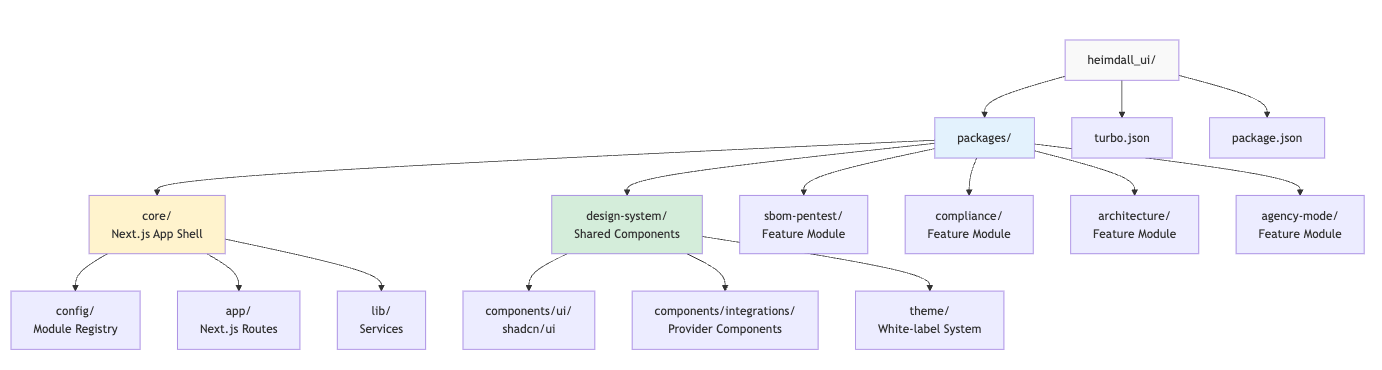
heimdall_ui/
├── packages/
│   ├── core/                  # Main Next.js application shell
│   │   ├── src/
│   │   │   ├── app/           # Next.js 15 App Router
│   │   │   ├── config/        # Module registry + initialization
│   │   │   ├── contexts/      # React contexts (org, user)
│   │   │   ├── lib/           # Services (orchestrator, AI, auth)
│   │   │   └── messages/      # i18n translations (44 languages)
│   │   └── package.json
│   │
│   ├── design-system/         # Shared UI components + theme
│   │   ├── src/
│   │   │   ├── components/
│   │   │   │   ├── ui/              # shadcn/ui components
│   │   │   │   ├── patterns/        # Reusable templates
│   │   │   │   ├── integrations/    # Integration components
│   │   │   │   └── white-label/     # Theming components
│   │   │   ├── theme/               # Theme provider + config
│   │   │   ├── lib/                 # Utilities
│   │   │   └── types/               # TypeScript types
│   │   └── package.json
│   │
│   ├── sbom-pentest/          # SBOM & Penetration Testing Module
│   │   ├── src/
│   │   │   ├── module.config.ts     # Self-registration
│   │   │   ├── pages/               # Module pages
│   │   │   └── widgets/             # Dashboard widgets
│   │   └── package.json
│   │
│   ├── compliance/            # Compliance Module (GDPR, NIS2, etc.)
│   ├── architecture/          # Architecture AI Module
│   └── agency-mode/           # Agency Mode Module
│
├── turbo.json                 # Turborepo build configuration
├── package.json               # Workspace root
├── pnpm-workspace.yaml        # pnpm workspace definition
└── CLAUDE.md                  # AI development guide
Why Turborepo?
- Parallel builds: All packages build simultaneously
- Incremental builds: Only rebuild changed packages
- Task pipelines:
builddepends on^build(dependencies first) - Remote caching: CI/CD uses shared cache
Self-Registering Module Pattern
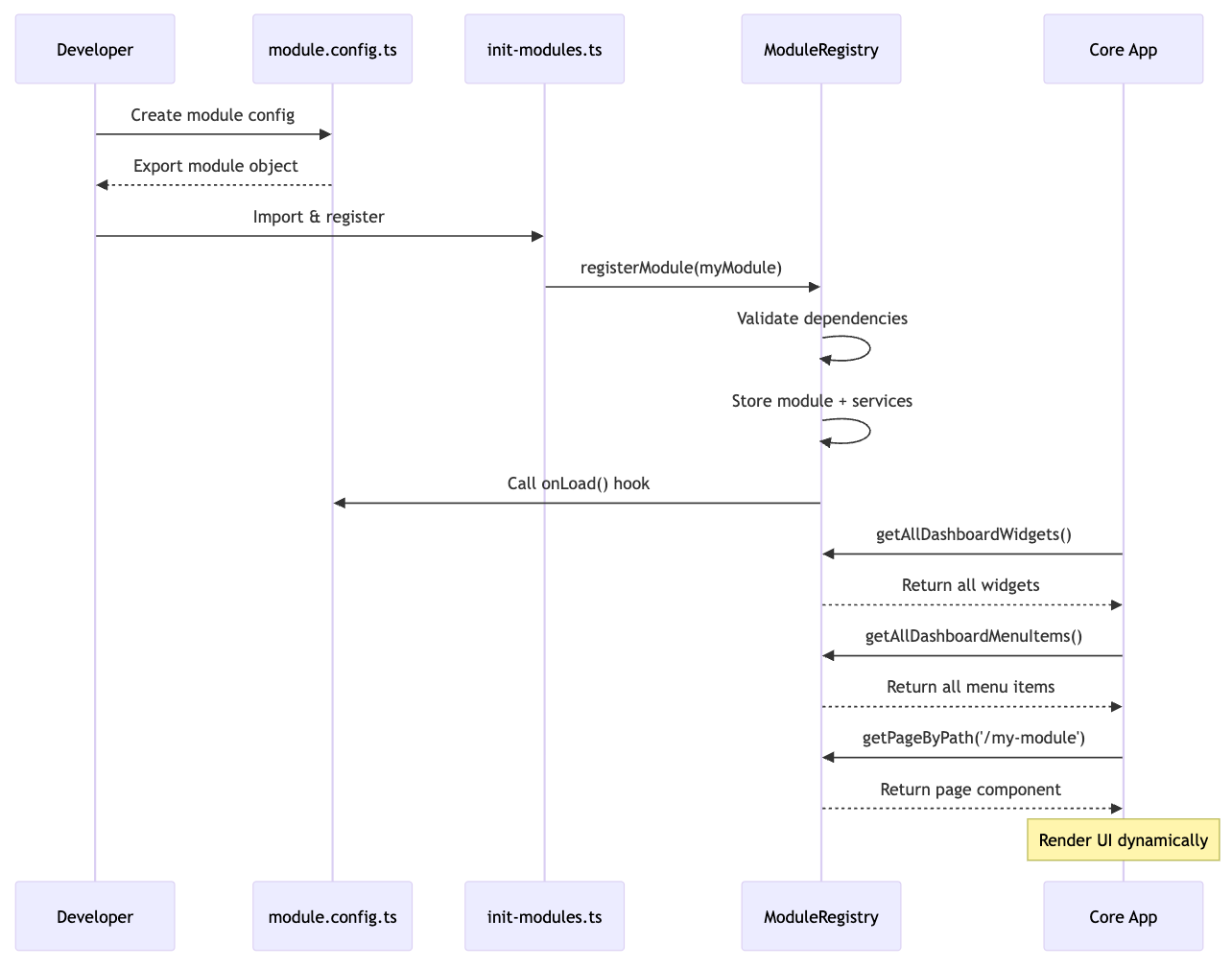
// packages/my-module/src/module.config.ts
import { HeimdalModule } from '@heimdall/design-system';

export const myModule: HeimdalModule = {
  // Identity
  id: 'my-module',
  name: 'My Module',
  version: '1.0.0',

  // Dashboard contributions
  dashboardWidgets: [{
    id: 'my-widget',
    title: 'My Widget',
    component: () => import('./widgets/my-widget'),
    size: 'medium',
    order: 5
  }],

  dashboardMenuItem: {
    id: 'my-nav',
    labelKey: 'myModule',
    href: '/my-module',
    icon: BarChart,
    order: 3
  },

  // Pages
  pages: [{
    path: '/my-module',
    component: MyModulePage
  }],

  // Lifecycle
  onLoad: async () => {
    console.log('My module loaded');
  }
};
// packages/core/src/config/init-modules.ts
import { agencyModeModule } from '@heimdall/agency-mode';
import { sbomPentestModule } from '@heimdall/sbom-pentest';
import { architectureModule } from '@heimdall/architecture';
import { complianceModule } from '@heimdall/compliance';

export function initCoreModules() {
  registerModule(agencyModeModule);
  registerModule(sbomPentestModule);
  registerModule(architectureModule);
  registerModule(complianceModule);
}
Each module requires one import and one registration call. The registry then handles all lifecycle management, dependency checking, and dynamic composition. The uniform pattern means adding a new module is literally two lines of code.
Future Enhancement: As module count scales beyond 15-20, this pattern could evolve to use Vite's import.meta.glob for file-based discovery, similar to the backend's Python entry points.However, note that these modules will be separate Git Repos in a future architecture change, so this pattern may remain similar.
Module Registry (Singleton)
// packages/core/src/config/module-registry.ts
class ModuleRegistry {
  private modules: Map<string, HeimdalModule> = new Map();

  register(module: HeimdalModule): void {
    // Check dependencies
    if (module.dependencies) {
      for (const depId of module.dependencies) {
        if (!this.modules.has(depId)) {
          console.warn(`Missing dependency: ${depId}`);
        }
      }
    }

    // Store module
    this.modules.set(module.id, module);

    // Call lifecycle hook
    if (module.onLoad) {
      await module.onLoad();
    }
  }

  // Query methods
  getAllDashboardWidgets() {
    return Array.from(this.modules.values())
      .flatMap(m => m.dashboardWidgets || [])
      .sort((a, b) => a.order - b.order);
  }

  getPageByPath(path: string) {
    for (const module of this.modules.values()) {
      const page = module.pages?.find(p => p.path === path);
      if (page) return page.component;
    }
  }
}

export const moduleRegistry = new ModuleRegistry();
Module Interface (Type-Safe)
// packages/design-system/src/types/module.ts
export interface HeimdalModule {
  // Module identity
  id: string;
  name: string;
  version: string;
  description?: string;

  // Landing page contributions
  showcase?: ModuleShowcase;
  landingNavItem?: LandingNavItem;

  // Module pages (catch-all route)
  pages?: ModulePageComponent[];

  // Dashboard contributions
  dashboardWidgets?: ModuleDashboardWidget[];
  dashboardMenuItem?: ModuleNavItem;

  // Services (shared functionality)
  services?: ModuleServices;
  hooks?: Record<string, () => any>;

  // Lifecycle
  onLoad?: () => void | Promise<void>;
  onUnload?: () => void | Promise<void>;

  // Dependencies (other module IDs)
  dependencies?: string[];
}
Benefits:
- Type-safe: TypeScript validates module structure
- Self-contained: Module = config + components + services
- Zero coupling: Core doesn't know about specific modules
- Hot reload: Changes reflect immediately in dev
This blog continues in Part 2, with the Integration Framework
heimdall-ui-a-composable-architecture-part-2